evaluation

Year Evaluation

It’s that time!~

I’m so close to handing everything in, and before I do so I need to reflect upon the year as a whole- the good, the bad and everything in between!


Semester 1

I hit the ground running for Semester 1 after a disappointing year repeating the second year of my degree at CCAD (now the Northern School of Art). I had big plans for the year, outlining some pretty ambitious projects for the coming months, including a fully fledged animation project and a few familiar competition briefs from the past, e.g. the Cheltenham Illustration Awards, which has always had a very engaging theme year on year.

Risograph Printmaking: The first project I decided to work on was the Riso project- I’d heard about the new printing facilities and was eager to try them out as part of the initial Semester 1 term, which was highly focused on skills development and experimentation with new techniques.

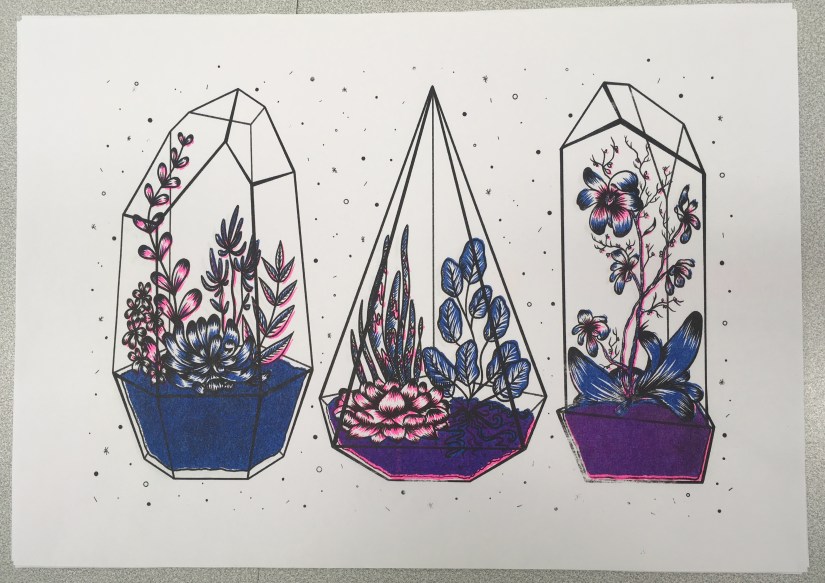
This proved to be a very steep learning curve, but I did enough research to somewhat know what I was doing. At this stage, we only had 3 ink colours and a plain black ink drum, which made my options somewhat limited. However, these colours produced a very ‘traditional’ riso print with the strong pink and blue inks, which was outside my comfort zone yet felt very fitting for my first go with the medium.

I was pleased that I’d given it a try, despite being a bit iffy with my final image- it felt quite far away from the rest of my body of work. At the time I wanted to revisit the process, but my current plans didn’t leave much room for negotiation.

Penguin Student Award: The next two projects were worked on simultaneously- the Penguin Student Award and my personal project, Narrative Animation Development.

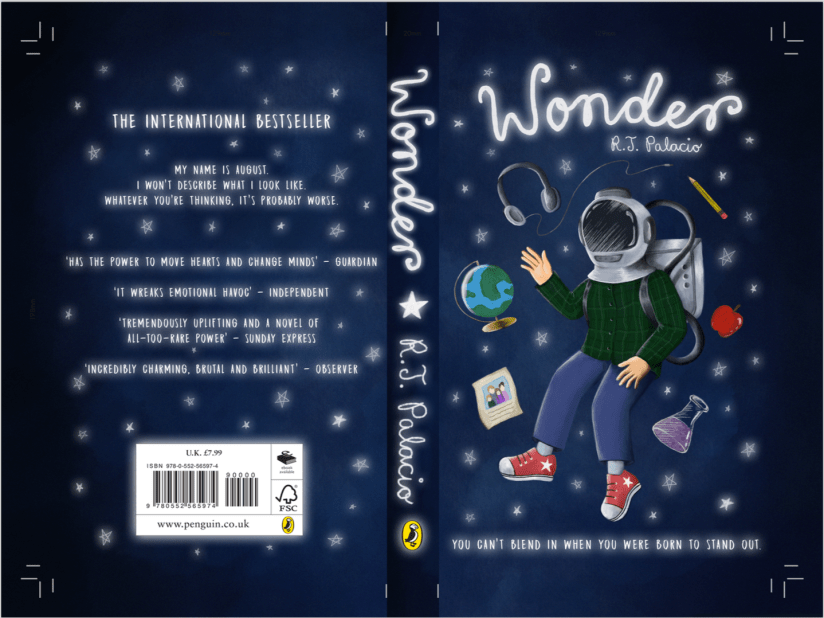
I chose Wonder by R.J. Palacio as the subject for the Penguin Award, as I was already familiar with the story and thought there’d be some really nice visuals to experiment with. I actually really enjoyed working on this, as it was a valuable experience that had clear industry links, which felt very worthwhile. I also loved getting back into typography and layout, as I hadn’t had a chance to work with these elements since my disastrous Pavilion Books brief while at CCAD (…maybe it wasn’t that bad, but it definitely felt that way). My final image was successful, even though I could have spent a little more time on the imagery rendering and overall finish.

This project was completed in the space of around 2 weeks, which was a feat for me since I tend to spend way too much time mulling things over in the research and development stages- which unfortunately impacted my work for the latter Narrative Animation project. :c

Narrative Animation Development: I was super excited to start work on this particular project as a finale for Semester 1, as it was based around an idea that had been mulling around in my head since the end of my FdA (summer 2017). I had planned for this to be my FMP at CCAD, which never happened since I moved back to Newcastle College after a tumultuous year. Therefore, I was determined to make it happen and started out with a concept project that would lead onto the animation realisation in Semester 2.

As I worked, I was easily able to map out my characters since they’d been fully formed for quite some time. There were negligible changes in appearance, but this was mostly practical so they were simplified enough to animate. However, time started to become very short and I ended up scrapping some of the more interesting elements of the project, including the background/environment designs which I was very eager to work on. My final project consisted of two character boards and accompanying development, some environment mood boards and a set of storyboards for the narrative.

At this point, I was well and truly knacked and vowed to never overstuff my proposal again.

Semester 2

Semester 2 was a bit of a disorganised monster, as I was so tired and stressed after the self-imposed heavy workload of Semester 1. I was very mindful when mapping out my proposal for this term- which led to the sad decision to remove the Animation Realisation project from my work plan. Ultimately, it felt too disconnected from the rest of my work planned for the year. Perhaps this is because the original inception of this project was quite a while ago, and I’ve grown as a person and an artist since then. Coupled with the immense amount of work it would take, I decided to postpone this project to be realised in my own time after my degree.

This left me with a bit of a gap in my schedule, so I decided to fill this in with a second Riso project after my pleasant experience in Semester 1. I had planned for the last commercial project to be the Cheltenham Illustration Awards, which felt was achievable, as well as being a good opportunity to create a stand out portfolio piece for the year. The final personal project was my Portfolio project my default.

Risograph Realisation: This time around I felt much more comfortable with the process and its capabilities, so I was able to utilise the full potential of the risograph printer. We also had some new ink colours which was a very welcome addition- the teal and purple inks created some really nice effects on my final artwork, and I was happy to be able to create artwork with these specific colours in mind.

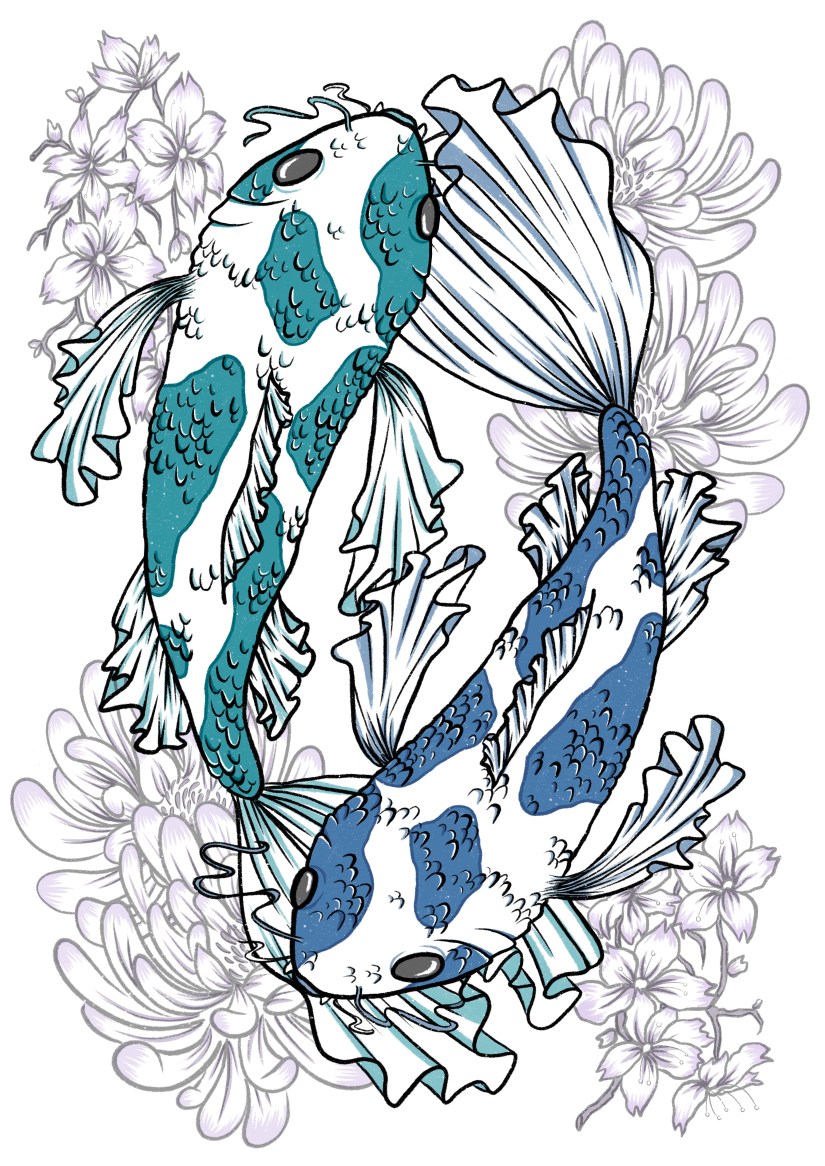
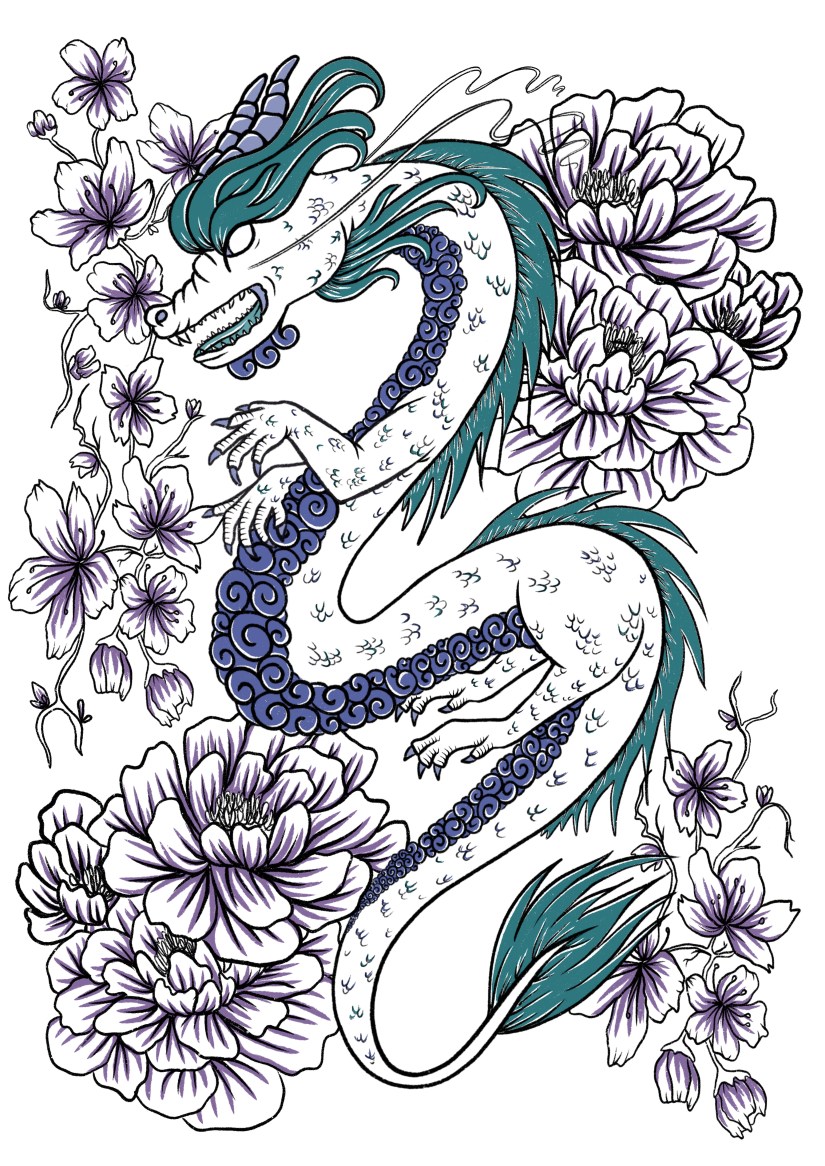
My final pair of prints was based on my travels last year, with an emphasis on the cross-cultural aesthetics of Chinese and Japanese design and symbolism. I was much happier with my outcomes compared to Semester 1, but I value both of the projects in my wider progression as an artist- I really want to continue to utilise this printing technique in my career and further work.

Cheltenham Illustration Awards: This project was nicely familiar to me, so there wasn’t really any struggle with the process or research elements. The theme this year was ‘Tales of Unity’, which was perhaps a little more niche and specific than in the past. Nevertheless, after a bit of initial struggle drafting out a suitable concept, I was able to use my new digital skills to effectively create a final piece that will serve as a centrepiece for the year (and final show).

Although I was used to the process, this project caused the most stress as it was completed in a short space of time right before the deadline (as the Risograph Realisation project overran by an alarming amount of time). I regret not leaving more time for the final realisation as this could have potentially made it even better- however, a deadline is a deadline and I’m not about to lose even more sleep over something out of my hands now~


Portfolio Project: This was a mandatory update on my existing portfolio- since lots of the work was still relevant, this made the workload much lighter than I’d anticipated. It also included making an updated portfolio book, which was good fun last year and was nice to revisit again. I also gave my creative CV and business cards a bit of a facelift, and also launched a new website! chalonjoy.com ~


Outcomes

…and here’s the final products! Most have been dotted around my blog already, but these are also on my ~new~ portfolio website… just a sly bit of self promotion there. c:
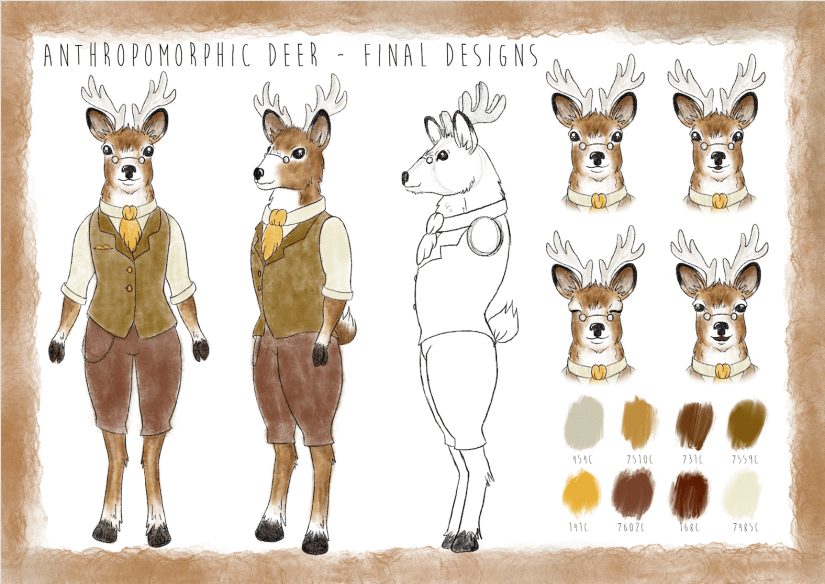
screen shot 2019-01-25 at 13.41.58
Anthropomorphic Deer Final Designs (Collingwood, 2018)


screen shot 2019-01-25 at 13.41.43
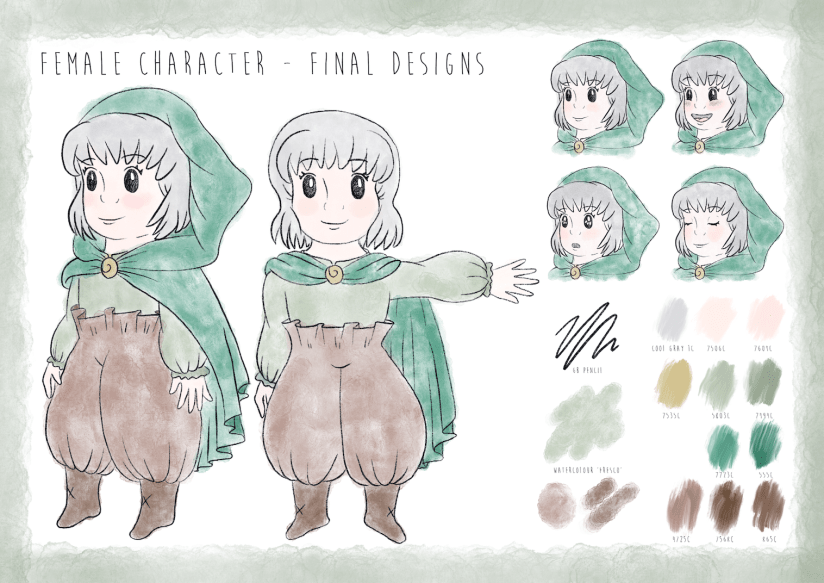
Young Female Character Final Designs (Collingwood, 2018)


screen shot 2019-01-25 at 12.31.31
Penguin Student Award: ‘Wonder’ Final Cover Art (Collingwood, 2018)


IMG_8014
Terrariums Risograph Print (Collingwood, 2018)


Koi_Final
Koi Fish Risograph Print (Collingwood, 2019)
Dragon_Final
Chinese Dragon Risograph Print (Collingwood, 2019)
FINAL_FILE_-3
Cheltenham Illustration Awards: Modernisation (Collingwood, 2019)


I’m now looking forward to final show, where I’ll hopefully be exhibiting my ‘best’ work from my degree, as well as selling some prints and other little bits of merchandise. I’ll blog about this afterwards too, even though my work will have (hopefully) been marked long before then!


Future Learning Plan/Progression

Targets and hopes for the future include:

  • Continuing to improve and enhance my skillset, particularly within commercial settings, and especially in pattern design and figural illustration- these are the two areas I enjoy working with most~
  • I also want to actively seek out opportunities for exposure, like open competitions and job openings that would suit my skillset. I’ll also look to improve my online presence, and look forward to fully launching my website and online store very soon!
  • Lastly, I want to endeavour to take life drawing classes, as I want to improve the figural elements in my work. They are my favourite thing to draw, but I still need to rely heavily on references to get something that looks remotely like a human. ^^” Hopefully having more free time will allow me to get stuck in at a weekly class, and I’m hoping to be able to draw more dynamic poses and better anatomy as a result. Especially hands. I hate hands.


As I jump over the last few hurdles before my deadline, I’ve found it to be quite cathartic to reflect upon the final year of my time as a student. I hope I manage to snag a First, but even if not I can safely say that I’ve tried my absolute best despite the drawbacks and issues I’ve faced in my life since returning to college.

I’m glad it’s all over after 4 years of deadlines and stress, but I’ll miss having a routine to stick to and a solid support network- I’ll have to build my own now ❀


References

Collingwood, C. (2019). Anthropomorphic Deer: Final Character Board [Digital].

Collingwood, C. (2019). Cheltenham Illustration Awards: Modernisation [Digital].

Collingwood, C. (2019). Chinese Dragon Risograph Print [risograph print].

Collingwood, C. (2019). Koi Fish Risograph Print [risograph print].

Collingwood, C. (2018). Penguin Student Award: ‘Wonder’ Final Cover Art [Digital].

Collingwood, C. (2018). Terrariums Risograph Print [risograph print].

Collingwood, C. (2019). Young Female Character: Final Character Board [Digital].
evaluation, portfolio, SWOT/Target Setting

Cheltenham Awards Final Piece Production

It’s been a busy week indeed!

In between running around like a headless chicken and trying to maintain a ‘healthy’ work/job/life balance, I’ve finally finished up my final project of the year ♥

It was quite an arduous process, but I think I actually really benefited from the super short time frame I’d been left with- not only was I working towards my deadline, I was also racing to get my art book submitted for publishing in time! I wanted this piece to be included, so that was another self imposed time limitation.

I created the piece on Procreate, using a variety of my own photos from my 2018 China trip to inform the architecture and layout. I clocked in just over 30 hours across 4 days according to the app, so here’s a wee time lapse video of my process to make a very long story short! (This is the 30 second quick cut- the longer time lapse video is about 12 mins long, and unfortunately I couldn’t quite get it to load up on Vimeo!)


So it was quite a linear, reassured workflow, but also had some new techniques being used since Procreate is a completely new tool to me since my last Cheltenham project in 2017. I’m really pleased with how far I’ve come, as my line art, layers and detailing/texture management has come leaps and bounds. While I still appreciate the flat, pastel-y appeal of my old Cheltenham piece, this newer one boasts a lot more depth, as well as a more experimental colour palette that really is quite ‘far out’ for me as an artist- up until now I really have been stuck in my ways with pastels and monotone, but the subject matter fully supported a warm, deep toned palette and I think it ties in quite well.

Here’s the finished piece- there’s loads wrong with it of course, but I’m content for now ♥

FINAL_FILE_-3
Modernisation (Collingwood, 2019)


Although I feel I’ve had a lot of success with this project, there were still some weak areas here and there- artwork wise, I think there’s still something amiss with the anatomy… but I have the time to fix this before final show, where I’ll hopefully be exhibiting this art as a centrepiece. If I’d have an ample amount of time prior to hand in this could have been fixed, but my workflow left me with a bit of a difficult situation- the way in which I’d blended the layers and applied tone and shading meant the line art and skin tones were across multiple layers, so it won’t be an easy task to correct this.

Working on this Cheltenham project has opened up lots more opportunities for me- I’m considering making a series of similar pieces based on my travels around the world. Also, when I submit this piece to the Awards I could potentially be featured in a catalogue showcasing selected entries from the year. Very exciting~


And with that, this wraps up my project work for Semester 2! Left to do is to finish off this blog, as well as some promo type stuff, like business cards, a creative CV and other artist-specific things like potential merchandise for final show. So, targets for the following week include tying up all the loose ends and making sure everything is ready and prepped for hand in, and also starting to think about final show- what I want to exhibit, sources for merchandise, and technicalities like layouts, exhibit space organisation, and marketing.


References

Collingwood, C. (2019). Modernisation [digital].

Collingwood, C. (2019). Modernisation Time Lapse .

evaluation, research

Year Review Presentation

As a tie-in post to my upcoming Year Review (edit: link here!), here’s a sneak peek of the slides I’ve prepared for my presentation I need to deliver next week. So scary!

This is a review of the entire year, and while most of the following will be purely visual, a full explanation will be posted very soon~


This slideshow requires JavaScript.

Click through to see quick reviews on each Semester, Final Outcomes, Reflection and SWOT for each project, Action Plans and Future Progression Options, as well as my trusty Radial Thinking infographic and bibliography for all my references~

I’ll fully explain all of this in my Year Review– which will be a bit of a whopper haha~

As a quick side note, even though I was still stressed and terrified to deliver this presentation, I feel as if I’ve come a long way compared to my first Project Proposal Presentation just before the start of Semester 1. I hope my mark reflects that I (hopefully) won’t be nearly as nervous! I’m also starting to be more confident when speaking about my work, because I’ve started to realise things with a much more solidified view on my personal style and ethics as an artist.

Another update will come next week once I’ve got this presentation day out of the way and I can work on starting the final realisation of my Cheltenham Illustration Awards project ♥


evaluation, SWOT/Target Setting

March 2019 – Progress and Reflection

It’s been a week or so since my visit to the museum, and I feel that despite always feeling that I’ve never done enough work (this is probably part *actual* truth and part self belief issues haha), I’m happy that I’ve managed to nail down my final concept after a series of initial and developed designs.

I think this riso project dragged a bit for the first couple of weeks- I suspect this is due to the fact that I spent a lot of time researching into the imagery that I wanted to use. I’m very aware of this subject matter potentially walking a fine line between appreciation and appropriation, so I wanted to take the extra steps to ensure I was representing each culture accurately. I also made use of my current knowledge as I do have a strong general interest in this topic, but I’ve learned so much more through thorough research. It’s always better to be safe than sorry, and I’m pleased that I was also able to expand my research file with this~

Drawing out the initials is really tedious for me- I much prefer sketching out the development, since this is building on an idea I really want to do (rather than drawing out ‘filler’ ideas). I fully admit I usually have a somewhat fully formed initial idea in my head when I start a project, so it can be hard to stray from this or try to show enthusiasm for the other initial ideas ^^”

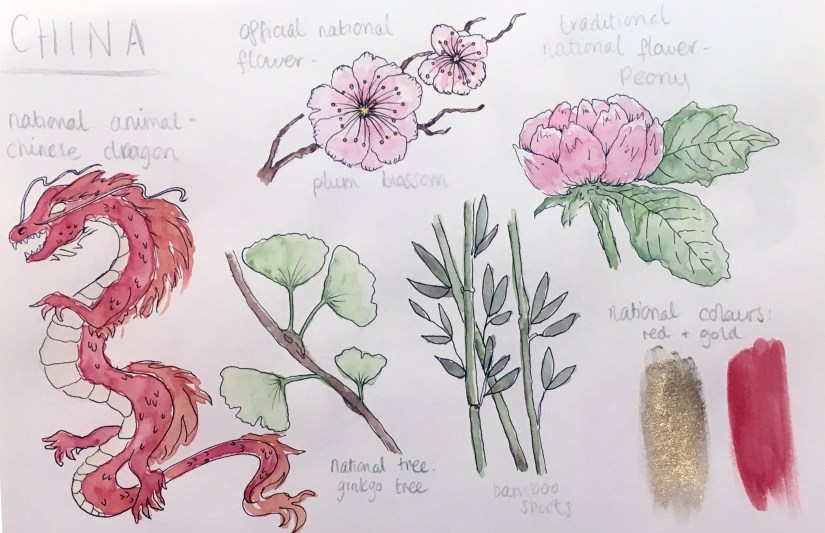
Another thing I really wished I’d done was to do all of my initials and development digitally- as well as aiding in the general layout, working digitally is much neater and less messy than scribbly pencil drawings (which my sketchbooks are notorious for). I tried to remedy this by doing a few little ‘key icons’ research pages in watercolour in my sketchbook- the phrase “you can’t polish a turd” comes to mind, but I had fun doing them anyway!

japaniconsheet
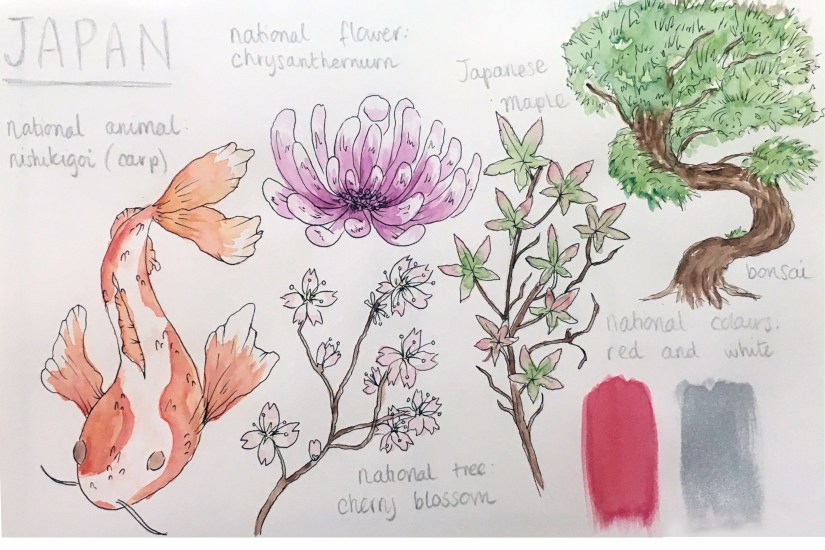
Japan Icon Sheet (Collingwood, 2019)


chinaiconsheet
China Icon Sheet (Collingwood, 2019)


It was really strange drawing and colouring something refined traditionally- I never thought it would come to this but I actually really prefer digital now! Especially since I’ve started working on Procreate with my iPad, since the technicality and effects both mimic tradition workflows very well. Throwback to the iPad review I wrote- read it here

Targets for the coming weeks include finishing off my digitised concepts, taking these into the final design stages, and looking further into colour choices with the riso.

I’ll have to be mindful of any threats to my progress such as time restraints and poor planning, as these things have hindered me in the past- however, I’m determined to keep better time this semester, as one of my targets from a few weeks ago was to manage time better.

More to come soon!


References 

Collingwood, C. (2019). China Icon Sheet [ink, watercolour].

Collingwood, C. (2019). Japan Icon Sheet [ink, watercolour].

evaluation, portfolio

Tailoring Your Career (Practice What You Love)

Getting into the real deal career stuff now, I thought I’d write a little post on my reflections on a fantastic talk presented by The Association of Illustrators (AOI) we had last Friday.

AOI visitor Lou Bones imparted lots of wisdom on us in the 2 hours we were spoken to, but one of the topics that stood out to me the most was about creating artwork that directs your interests (and your clients)- put simply, ‘create what you love to do and the work will follow’~

Now that doesn’t mean that freelancing is gonna be easy (that’s far from the truth!), but building a portfolio based upon work that you’d like to take on is key to getting jobs that promote self growth as an artist without straying too far from personal preference.

There’s loads of areas you can aim towards- to name a few, we have editorial, fashion/costume design, commercial advertising, fine art (art for its own sake), and concept design. There are areas that could use illustrative talent almost everywhere you look; the possibilities (and opportunities) are truly endless.

For example, I’ll personally be working on pattern design, character-led imagery, editorial style imagery and possibly printmaking (as well as a variety of other areas) that best describe my artistic style and interest. I also really want to get into typography some more, as this is a really prevalent application in the industry today and could come in useful for a variety of jobs.

Through doing this, I can display the kind of work on my website that will look attractive to clients looking for that type of artwork- in theory! ^^”

Obviously, it’s really beneficial to have a wide range of styles/applications of work to showcase as this opens up many more potential job opportunities compared to sticking to familiar ground. Not all jobs will be to my taste, but I hope by pointing my artistic style in the right direction will yield good results ♥


References

Association of Illustrators (2017). The AOI – Stand Stronger Together [online]. Available at: https://theaoi.com [Accessed 6 Feb 2019].

evaluation, SWOT/Target Setting

Semester 1 – Evaluation and Reflection

I’m so pleased all of my Semester 1 work is done and dusted!!

Just to tie all the loose ends up, I’ll be summarising The Good, The Bad and The Ugly (read: strengths, weaknesses and threats), as well as upcoming goals and opportunities for the future c:


Strengths

For me, the most successful part of Semester 1 was my experience with Procreate, and the steep yet successful learning curve that went along with it- I found using the iPad Pro/Apple Pencil combo to draw directly onto the screen to be really refreshing and user friendly, rather than using a traditional ‘screenless’ tablet (e.g. Wacom Intuos) and Photoshop on a laptop, which wasn’t very intuitive at all.

Through creating art with this new workflow, I’ve been able to gain back some of my confidence when it comes to drafting and artwork in general- I’m not the most confident person by any means, but I’ve had lots of further difficulty in the past year or so that has really affected my ability to produce something I’m pleased with. I’m trying to become a more optimistic and outgoing person, so this is a small victory for me that I’m really proud of ♥


Weaknesses

While I feel the semester went well overall, there were definitely areas which I was really unhappy about and couldn’t wait to finish off and leave behind. Timekeeping has always been an issue for me, and I wish I’d spent a bit more time learning the ins and outs of the riso process before jumping in with my solid colour choices and largely single opacity layers.

My final grade will speak for itself, I just hope I can do enough in these subsequent modules to achieve a good class of degree. I’ve previously been able to scrape a First during my FdA, but I’ll be pleased (albeit it slightly less so) with a 2:1… anything else is a bit out of the question for me ^^”


Threats

Threats for the future include lack of time management and my own self-belief, as I know this can really hold me back if I let it get to me too much. I also don’t want to become too reliant on digital processes, as I feel I really need to retain my sound knowledge of traditional art. I’d love to include some nice originals in my portfolio, so this is something I’d like to work towards even if it doesn’t form the bulk of an actual personal or commercial project (I can work on this independently as part of my portfolio project, too).


Goals and Opportunities

My goals for Semester 2 include continuing to work with a variety of processes and techniques, while also coming back to my roots and creating some high quality portfolio centrepieces that I’ll be pleased to display during final show. Convincing myself is the biggest struggle of all, so I’ll also be actively working on favouring my work a little bit more to help me find peace with myself.

Onwards and upwards!

evaluation, portfolio

A Short Timeline of The ‘Wonder’ Project

Well I’ve been productive this week…~

(haha but no really, I essentially just finished the Wonder Penguin Project in 4 days). It was intense, but it worked!

I didn’t mean to take such a small amount of time for this (my initial timetable gave me 4 *weeks* from mind map to final cover), but having so much downtime in my life made me reevaluate how long I really had to complete this brief. I have so much in store for PP2 that I didn’t want to waste any more time than necessary on what was supposed to be my ‘shortest’ project- that thought took on a while new meaning…

I had already researched into some existing source material e.g. book covers and film posters before the Christmas break, so I’d be lying if I said I didn’t have a rough idea of what I wanted to do. With this research in hand, I started to draft out some concepts of the cover, evaluating each one and choosing the most successful to take forward to development. This was all pretty run of the mill development work that I completed over the course of a day, so I’ll move onto the more interesting stuff~

I worked in Procreate again to bring the final product to life- I feel that my workflow has really come into its own since I started using my iPad as a key tool in my process; it’s the perfect balance between familiar traditional technique and the ease and innovation of digital painting. I was able to scan in my final concept from my sketchbook and work directly on top of this in Procreate, where I could fine-tune the details, proportions, etc.

Procreate tells me I clocked in at just under 8 hours with over 7000 strokes to complete the cover- that’s quite an interesting stat! I’m pleased with the final image:

screen shot 2019-01-25 at 12.31.31
Wonder Final Cover Art (Collingwood, 2019).

I’ll be making a mock-up final product by laminating my printed cover onto an existing copy of the book before hand in too… it’ll be nice to see a ‘finished product’!

I’m expecting to have to make a few wee changes/additions to the project work (particularly the written work) once I have a pre-hand in tutorial, but for the most part I can put this project to rest. ♥


More next week as the deadline draws near!


References

Collingwood, C. (2019). Wonder Final Cover Art [Digital].

evaluation

Mini Riso- ‘Minerals’ Photography Print / Project Evaluation

Alongside my work for the Penguin Award and the Animation Development projects, I’ve been making a smaller ‘mini’ A4 risograph image, this time making use of photographic elements instead of illustration, as this is something I didn’t get to experiment with when I made my terrarium prints.

I’d originally intended to use my own photography for this side-project, but Royal Mail had other plans since all the rock minerals I’d ordered to photograph haven’t arrived… :c So purely for the purpose of experimentation, I’ve collaged together some royalty-free images (which are all referenced in my project development file) to use as a experiment- I’ll most likely be able to take my own imagery in the future to use for photographic risograph work, as I don’t want to include something in my portfolio that isn’t entirely self-produced. I collaged the images together quickly in Photoshop- I used my notes from my development work as a set of ‘rules’ when laying out the photographs.

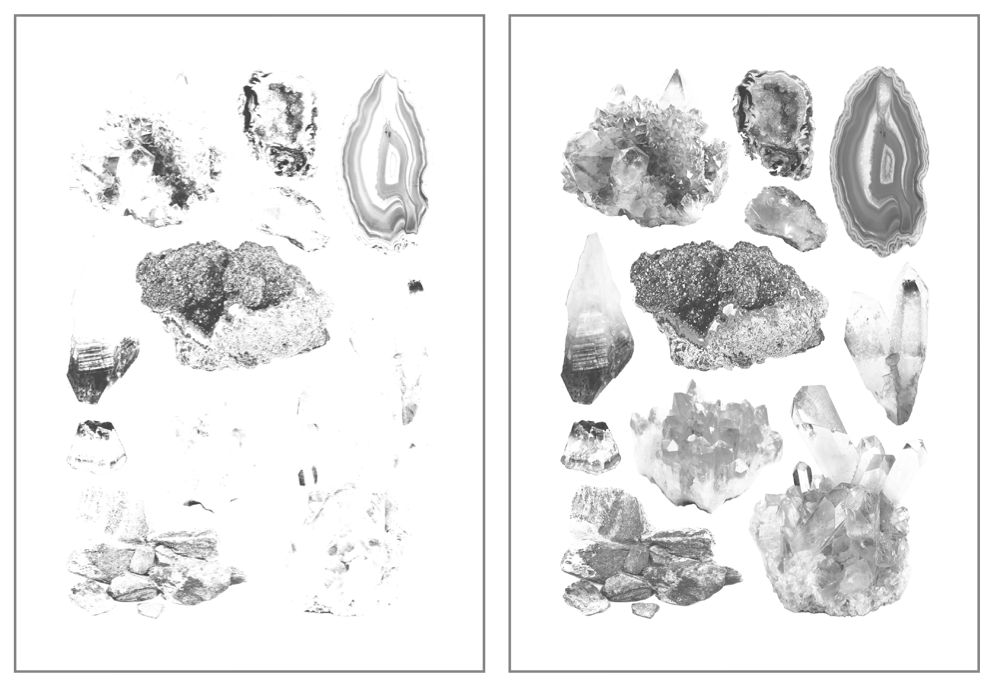
Once this was ready, I converted the image to black and white and duplicated the layer, one of which I edited using various Adjustment tools- I heightened the contrast and brightened up the second/upper layer, which meant only the darkest tones made it through into the final image- I’ll print this in the blue ink we have for the riso, with the base layer (with a wider range of light and mid-tones) printed in pink. Based on past experience with the riso during my terrarium printing run, I’ll be editing these on the riso prior to printing, bringing the ink coverage down to around 15-20%, as I don’t want bright colours on this print. The pink is extremely bright, and the blue extremely dark- hopefully reducing the coverage down to practically nothing will solve the problem. Below is my two final layers, ready for printing:

Screen Shot 2018-12-14 at 10.58.28.png
 Mini Minerals Riso – Printing Layers (Collingwood, 2018)


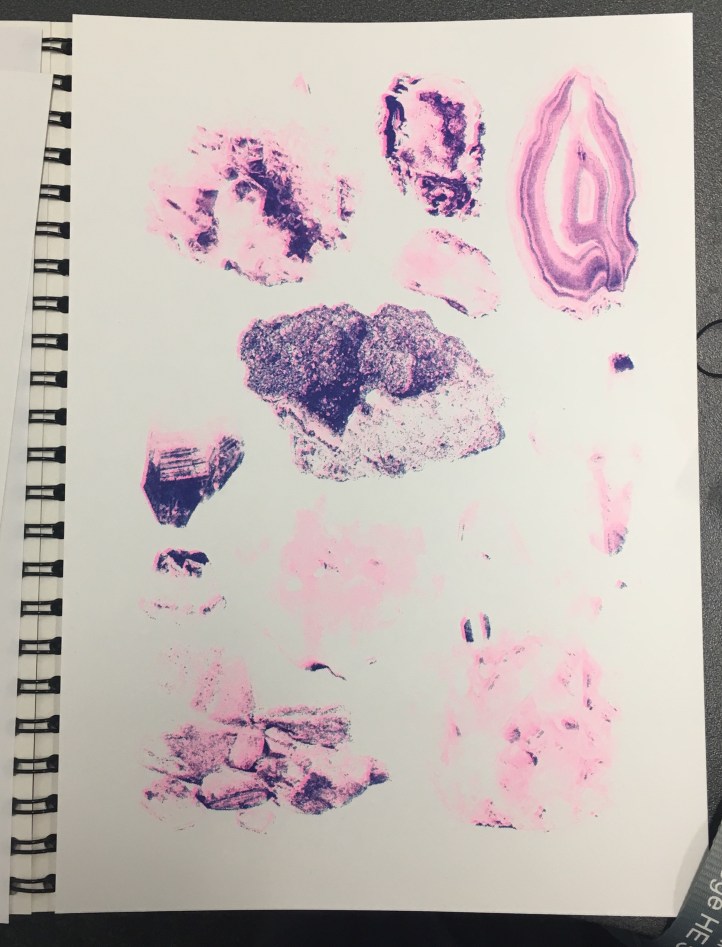
Obviously the printing process was much the same as the terrarium prints (again, all of this is documented much more in-depth in my development file), but this time I added halftones (via the riso)… and it worked well! Except that all of my prints were too light, haha. I initially thought that I’d need to make the masters super light to combat the really pigmented inks, but I think I went too far the other way, as lots of detail was lost in the final prints:

IMG_8117.jpg
My final prints- not quite to plan, but still a success experiment-wise! (Collingwood, 2018)

But, not to worry… this was a purely experimental exercise- when I’m able to take my own pics I’ll run some more prints off again, keeping in mind everything I learned throughout this test. I enjoyed the process anyway, and there’s no improvement to be gained unless you fail first!

Reflecting on the project as a whole… I’m glad I got to use the risograph printer, since it’s a process I’ve been interested in since hearing about it just over a year ago. It’s certainly been unconventional for me, since the colours are so restricted (and BRIGHT!), as well as the digital process involved in making artwork riso-ready. It was really nice to try out new techniques and styles of artwork all in the name of suitability, since prior to this I’ve been quite stuck in my ways. I’d love to revisit this in the future, but for now it’s definitely high time to start on the next Semester 1 projects…

Onwards and upwards c:


References

Collingwood, C. (2018). Mini Minerals Riso- Printing Layers 1 and 2 [Digital].

Collingwood, C. (2018). Mini Minerals Riso- Final Print [Risograph Print].

evaluation

Risograph Printing / Weekly Reflection 3.12.18

After a myriad of issues that got in the way of this project, I was finally able to print some risograph images today~

First, I’ll recap the prepping process for the imagery:

Once I had the line art drawn out (done on Procreate, which I’m slowly getting the hang of), I began to apply colour on separate layers underneath the line art. I chose to work with pink and blue inks, as these were two of the 4 colours available at the time. I’m not entirely sure about this colour scheme (it’s a bit out of my comfort zone), but I persevered nonetheless since nothing is set in stone colour-wise with the riso. Having said that, this project is all about experimentation so I’m consciously trying to work with colour schemes I haven’t used yet.

I’ll admit- I’m not used to working in this way, so the way in which I’d ‘blindly’ applied colour was painfully obvious on screen once I’d altered the layer opacities (see below for each separate layer). This will be something to remember in future if I re-do the colour (which I might actually end up doing, since we’ll be getting some more ink colours soon).

Screen Shot 2018-11-30 at 11.16.13
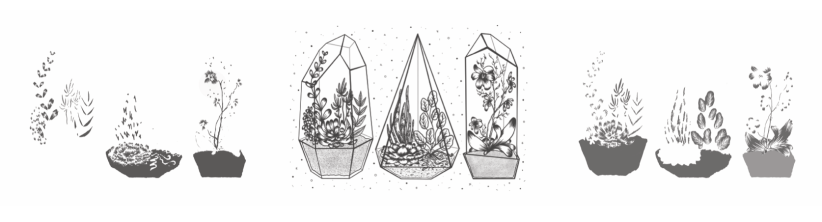
Left to right: Blue layer, Black layer, Pink layer for Risograph printing. (Collingwood, 2018).

It’s also worth noting that no ink layer should be above 75% opacity, in order to avoid smudging and paper jams in the riso. My final layer opacities ranged from 20% (the ‘back’ of the terrarium frames) to 75% (the main black line art), with the coloured layers at 30-50% and 60% in between. By exporting each layer as a separate file, I was able to layer colours when printing (since the ink is semi-transparent), making a mid-purple tone where the inks crossed over.

I’ve gone into much further detail about the print process in my development file, but here’s a pic of the final prints:

IMG_8014.jpg
Terrariums Final Print (Collingwood, 2018).

I was actually really pleasantly surprised at how nicely the image printed- although the registration isn’t perfect (which is a common trait of riso printing), the layers blended well and weren’t as messy looking as they appeared on screen.

At this point, I didn’t love my colour palette but I didn’t hate it, either- I’m most likely going to do another run next week, with neater colour layers and a more considered colour palette. Having green ink available will be really helpful!

…But at the same time, I don’t want this project to drag on for too long, since I want to really focus on the Animation Development brief I’m doing (this is especially important, as it will directly influence the Animation project in Semester 2… if the Semester 1 portion isn’t successful, I won’t have a solid foundation to work on!)

Also still to print is the mini A4 photography based geode flash sheet I’m doing as a side project ♥


References

Collingwood, C. (2018). Risograph Digital Ink Layers: Blue, Black, Pink [Digital].

Collingwood, C. (2018). Terrariums [Risograph print].

evaluation, portfolio, SWOT/Target Setting

Printing Session and Week Reflection 19.10.18

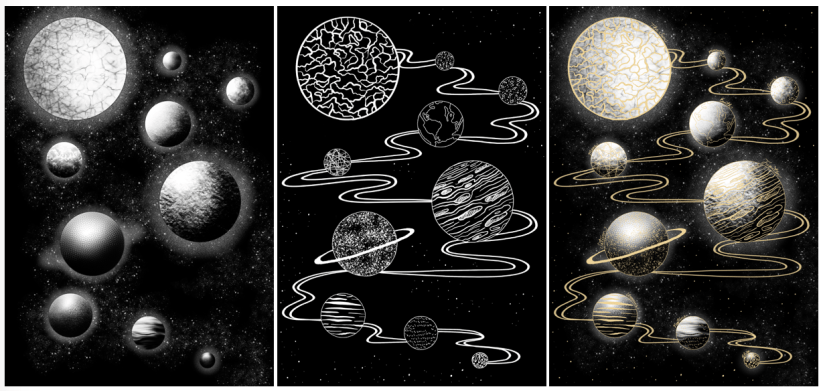
Over the past week, I’ve worked on a simple design that can translate into a screen print. Basing my concept on the idea of planets and digital fills (as inspired by the tutorial Dave showed us on Friday), I worked in Procreate to design both a gold layer, and a black and white screenprinted layer. Final designs below (left to right: Base/screenprinted layer, gold leaf layer, mock up of ‘final’ image with both layers):

Screen Shot 2018-10-22 at 10.44.51
Left to right: Figure 1, Figure 2, Figure 3

Using Procreate is a whole new learning curve for me, as up until now I’ve worked mostly in Photoshop. My previous digital work has been done using a Wacom Intuos tablet, which I often found a bit hard to use (e.g. not being able to rotate it to draw, having to reference back to the screen when drawing, small size and lagging software).

Overall I was happy with my workflow, but earlier this year I invested in an iPad Pro as an additional tool. Ultimately I’ll still finalise my work in Photoshop as Procreate isn’t as extensive, but it’s invaluable having a drawing device with a screen- it feels much more natural, and it’s easier to draft out artwork compared to using a conventional drawing tablet.

One of the most useful tools I discovered actually came from a calligraphy brush kit- a variable line brush that smooths jagged edges and creates nicely curved lines (almost in a similar style to Illustrator, but without all the fiddling). There’s a plethora of times that I could have used this brush in the past, so I’ll definitely keep this in mind for the future!

Come Friday morning, it became quite clear that I was a bit ambitious with the black layer- Dave suggested that I instead print the gold layer as a complete image, so I decided to go with this (possibly going back and editing the black layer to be more screen print friendly at a later date). I’m glad I discovered this early on in the year, as it’ll inform any future imagery that I produce for screen printing.

I experienced some issues with the screen machine- my design wasn’t burned to the screen properly; the black background border was fuzzy on one corner. I’m putting this down to a technical issue that will hopefully be fixed in the future, as I think having a border on a screen print sets it off nicely, especially for trimming and framing. I’ll probably mask the corner border off and correct this by painting on the acrylic in ‘post-production’.

In the afternoon we were shown a quick recap of how to gold foil using the heat press- this was really useful because although I’ve worked with this process before, it was quite a few years ago now and I definitely benefitted from the refresh. There’s a much wider variety of foils now (e.g. iridescent foil, clear foil, and an array of different coloured metallic foils), all of which will be nice to experiment with ♥

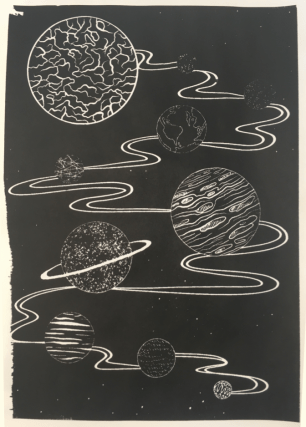
Friday was full of trial and error- in addition to the corner not being complete on any of my prints (which was expected), I had lots of issues with the amount of ink I was using (usually not enough ink). My 6th print (out of 8 total) was the most successful- I was surprised how well the fine lines came out, despite the pre-emptive warning that 12px was the finest line weight that would translate optimally. Below is my most successful print (I could have used slightly less ink):

Screen Shot 2018-10-22 at 11.14.30
Figure 4

I really love the process of screenprinting, so I’ll definitely be revisiting this in the future, hopefully with better results.

In the next week, I plan to finally start on my riso project- I’m a bit stressed out about this as I haven’t stuck to my timetable thus far (which is an awful start to the year). However, the past week hasn’t gone to waste as the development for this screen print can be linked into my Printmaking project as development and technique exploration, which is the purpose of the first Semester anyway~


References

Figure 1: Collingwood, C. (2018). Planets (Base Layer) [Digital].

Figure 2: Collingwood, C. (2018). Planets (Gold Layer) [Digital].

Figure 3: Collingwood, C. (2018). Planets [Digital].

Figure 4: Collingwood, C. (2018). Planets Test #6 [Ink].