evaluation, portfolio

A Short Timeline of The ‘Wonder’ Project

Well I’ve been productive this week…~

(haha but no really, I essentially just finished the Wonder Penguin Project in 4 days). It was intense, but it worked!

I didn’t mean to take such a small amount of time for this (my initial timetable gave me 4 *weeks* from mind map to final cover), but having so much downtime in my life made me reevaluate how long I really had to complete this brief. I have so much in store for PP2 that I didn’t want to waste any more time than necessary on what was supposed to be my ‘shortest’ project- that thought took on a while new meaning…

I had already researched into some existing source material e.g. book covers and film posters before the Christmas break, so I’d be lying if I said I didn’t have a rough idea of what I wanted to do. With this research in hand, I started to draft out some concepts of the cover, evaluating each one and choosing the most successful to take forward to development. This was all pretty run of the mill development work that I completed over the course of a day, so I’ll move onto the more interesting stuff~

I worked in Procreate again to bring the final product to life- I feel that my workflow has really come into its own since I started using my iPad as a key tool in my process; it’s the perfect balance between familiar traditional technique and the ease and innovation of digital painting. I was able to scan in my final concept from my sketchbook and work directly on top of this in Procreate, where I could fine-tune the details, proportions, etc.

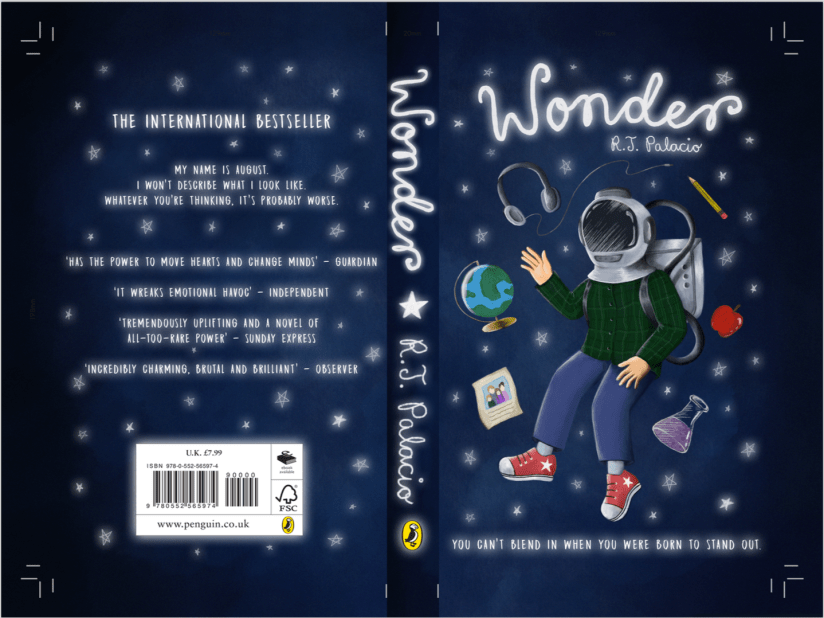
Procreate tells me I clocked in at just under 8 hours with over 7000 strokes to complete the cover- that’s quite an interesting stat! I’m pleased with the final image:
screen shot 2019-01-25 at 12.31.31
Wonder Final Cover Art (Collingwood, 2019).

I’ll be making a mock-up final product by laminating my printed cover onto an existing copy of the book before hand in too… it’ll be nice to see a ‘finished product’!

I’m expecting to have to make a few wee changes/additions to the project work (particularly the written work) once I have a pre-hand in tutorial, but for the most part I can put this project to rest. ♥


More next week as the deadline draws near!


References

Collingwood, C. (2019). Wonder Final Cover Art [Digital].
evaluation, portfolio, SWOT/Target Setting

Printing Session and Week Reflection 19.10.18

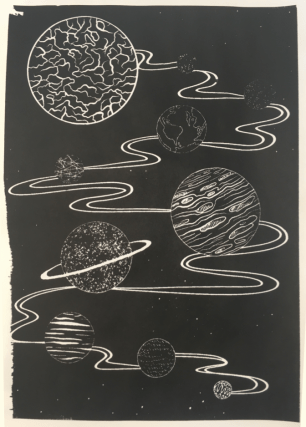
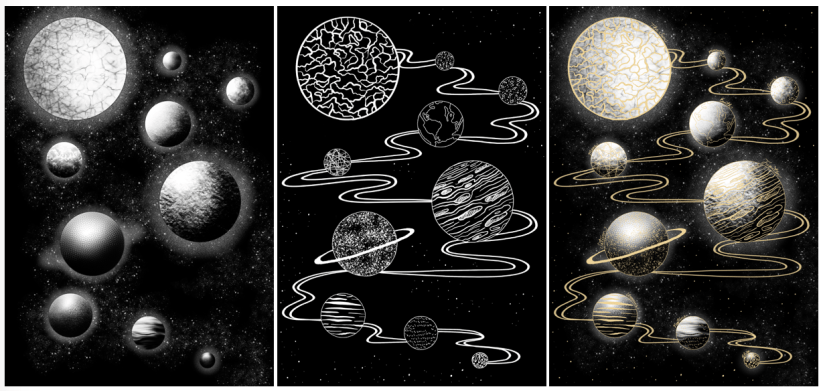
Over the past week, I’ve worked on a simple design that can translate into a screen print. Basing my concept on the idea of planets and digital fills (as inspired by the tutorial Dave showed us on Friday), I worked in Procreate to design both a gold layer, and a black and white screenprinted layer. Final designs below (left to right: Base/screenprinted layer, gold leaf layer, mock up of ‘final’ image with both layers):

Screen Shot 2018-10-22 at 10.44.51
Left to right: Figure 1, Figure 2, Figure 3

Using Procreate is a whole new learning curve for me, as up until now I’ve worked mostly in Photoshop. My previous digital work has been done using a Wacom Intuos tablet, which I often found a bit hard to use (e.g. not being able to rotate it to draw, having to reference back to the screen when drawing, small size and lagging software).

Overall I was happy with my workflow, but earlier this year I invested in an iPad Pro as an additional tool. Ultimately I’ll still finalise my work in Photoshop as Procreate isn’t as extensive, but it’s invaluable having a drawing device with a screen- it feels much more natural, and it’s easier to draft out artwork compared to using a conventional drawing tablet.

One of the most useful tools I discovered actually came from a calligraphy brush kit- a variable line brush that smooths jagged edges and creates nicely curved lines (almost in a similar style to Illustrator, but without all the fiddling). There’s a plethora of times that I could have used this brush in the past, so I’ll definitely keep this in mind for the future!

Come Friday morning, it became quite clear that I was a bit ambitious with the black layer- Dave suggested that I instead print the gold layer as a complete image, so I decided to go with this (possibly going back and editing the black layer to be more screen print friendly at a later date). I’m glad I discovered this early on in the year, as it’ll inform any future imagery that I produce for screen printing.

I experienced some issues with the screen machine- my design wasn’t burned to the screen properly; the black background border was fuzzy on one corner. I’m putting this down to a technical issue that will hopefully be fixed in the future, as I think having a border on a screen print sets it off nicely, especially for trimming and framing. I’ll probably mask the corner border off and correct this by painting on the acrylic in ‘post-production’.

In the afternoon we were shown a quick recap of how to gold foil using the heat press- this was really useful because although I’ve worked with this process before, it was quite a few years ago now and I definitely benefitted from the refresh. There’s a much wider variety of foils now (e.g. iridescent foil, clear foil, and an array of different coloured metallic foils), all of which will be nice to experiment with ♥

Friday was full of trial and error- in addition to the corner not being complete on any of my prints (which was expected), I had lots of issues with the amount of ink I was using (usually not enough ink). My 6th print (out of 8 total) was the most successful- I was surprised how well the fine lines came out, despite the pre-emptive warning that 12px was the finest line weight that would translate optimally. Below is my most successful print (I could have used slightly less ink):

Screen Shot 2018-10-22 at 11.14.30
Figure 4

I really love the process of screenprinting, so I’ll definitely be revisiting this in the future, hopefully with better results.

In the next week, I plan to finally start on my riso project- I’m a bit stressed out about this as I haven’t stuck to my timetable thus far (which is an awful start to the year). However, the past week hasn’t gone to waste as the development for this screen print can be linked into my Printmaking project as development and technique exploration, which is the purpose of the first Semester anyway~


References

Figure 1: Collingwood, C. (2018). Planets (Base Layer) [Digital].

Figure 2: Collingwood, C. (2018). Planets (Gold Layer) [Digital].

Figure 3: Collingwood, C. (2018). Planets [Digital].

Figure 4: Collingwood, C. (2018). Planets Test #6 [Ink].

about, evaluation

Year 3 Objectives and Learning Plan

Before I start working on my Project Proposal treatment, I want to do a quick recap on what I’ve learned thus far, as well as planning out a Learning Guide for new skills throughout the coming year~

Overall Objectives

To summarise my design practice for this year, I’d like to expand upon my already existing skillset while also adopting some new techniques and workflows, such as risograph printing and furthering my digital prowess. To achieve these goals, I want to be able to utilise all the available valuable resources at the college, as well as return back to my roots with traditional and digital illustration.

Furthermore, I want to be able to develop my concepts this year to evoke deeper emotion and meaning- this could be through the usage of symbolism, emotive motifs, and other vehicles for portraying an idea through visuals.

Some of the most important areas I want to develop and improve throughout Year 3 include:

  • Concept Development
  • Visual Aid Research/Figural Drawing Improvement
  • Technique Refinement/Improvement of Rendering and Visualisation
  • Progression of Confidence and Personal Reflection Skills


Strengths and Weaknesses

While I anticipate that I’ll be able to help myself achieve these targets as I progress through the year by promoting a positive learning environment, I know there may be areas of weakness, as well as strengths.

For example, timekeeping is always an essential part of success, as bad timekeeping can have a massive impact on the quality of a project. I’ve identified this plenty of times in the past, but this is the big issue for me and I really want to work on improving my timeliness this year.

Another weakness is digital skills in programs such as Cinema4D and After Effects- I intend to produce an animated piece for a project in Semester 2 (STC), and this may very well see me having to make use of these programs. If I undertake the animation project as planned, I’ll endeavour to widen my skillset and broaden my understanding of digital animation programs as much as possible.

Moving onto strengths, I am quite proficient at creating pattern work and characters, as well as drawing upon many different work processes to create digital collages that utilise many different techniques (both digital and traditional). I love working on all of the above, so in order to balance out the struggles I might face during the Animation project, I’ll ensure to work on projects using these skills so I can showcase my most confident work, as well as continuing to build upon my skills and improve further.


Professional Development Plan

  • Skills, Knowledge and Experience– I’ve already outlined this above, but I anticipate that I’ll be able to include lots of skill and knowledge building in my projects, both through the revisitation of developed skillsets and by experimenting with new processes and workflows, particularly during Semester 1.
  • Processes and Methods– I am really looking forward to exploring risograph printing during Semester 1, with the possibility of extending this further into Semester 2 for additional project work if the outcome is desirable. Again, as previously mentioned I also want to continue to improve my existing digital skillset, as this is an imperative part of my creative practice and any improvement is welcome. As well as these physical work processes, I also want to improve my mental workflows which link to timekeeping and having a more positive outlook on my artistic journey as an illustrator.
  • Commercial Context– As far as industry progression goes, I’d love to flesh out my portfolio to be more in keeping with a certain art style and aesthetic- at the moment, my work is quite eclectic and while this isn’t really a bad thing, it’s still something that I need to bring together into a more cohesive look. For the future, my goals are to work freelance in various contexts that align with my personal tastes (although I realise this might not always be possible!), as well as continuing to develop my work to become more applicable to a variety of applications; while also maintaining a strong yet adaptable personal style.
  • Possible Collaborators– I already have some competitions/live briefs in mind that I would like to enter as part of the Commercial portions of both Semester 1 and 2- I’m hoping the Cheltenham Illustration Awards continues in 2019, as I throughly enjoyed working on this brief in 2017 for one of my final pieces. The Penguin Student Award is also on my radar, as I worked with book illustration during my time at CCAD last year and enjoyed the experience. Also, since I usually work alone as an artist, I’m looking forward to collaborating with the rest of my course for the final show, as portions of our show will be a group effort, e.g. marketing, branding, etc.
  • Possible Sources of Research–  Throughout the year will include artist research, existing artwork research (for example, if working on a commercial project), and visual aid/reference research wherever appropriate in my project work. I will also research into deeper meaning and contextual study to support the progression of my concept building and symbolic deeper meaning in my work (as outlined in Overall Objectives).
  • Anticipated Problems/Specialist Access to Resources– Since some of my predicted projects include specialist equipment, I’ll need to make sure I plan in advance when I will be using these areas (e.g. the risograph room), as I’ll need to be mindful of other people booking sessions, particularly around hand-in where it might not be possible to choose an alternative day. Also, as I have already identified some of my potential threats/weaknesses in my workflow and skillset, I should be able to work proactively to avoid conflict and loss of morale when working on my projects.


With this information laid out, I’ll be able to make better decisions when writing out my Proposal and Treatment for the entire year. More updates soon! ♥