portfolio, research, SWOT/Target Setting

Risograph Realisation – Idea Finalisation

It’s been a bit of a weird week- I haven’t made as much progress as I’d hoped with this riso project but any progress is better than none at all! ♥

I’ve been looking at finalising my riso ideas, and while these are still fairly rough drafts I find it much easier to visualise a final concept in a neater, tidier visual style (e.g. I’ll be really finishing up the layout in the actual final piece process, which is much easier thanks to the flexibility of Procreate).

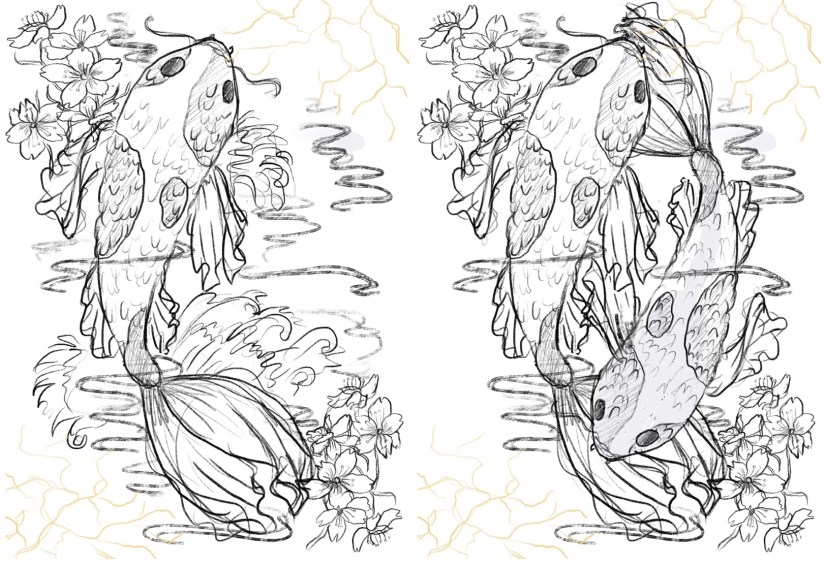
So far, I’ve got 4 potential ‘final’ layouts, each with differences that affect the way in which the artwork fills out the frame of the piece- since these will be A3, the actual image will be slightly smaller on each side (~2.5cm) due to the riso printing limitation. I’ve also begun to visualise how I can embellish these pieces (see the light gold coloured overlay on each piece for ideas on which areas I might work into- this is all TBC!).
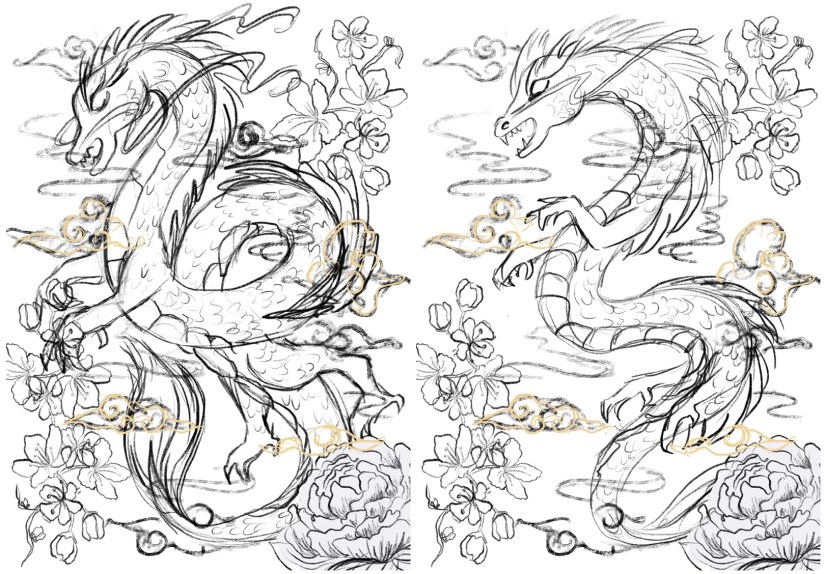
China Risograph Print Final Concepts (Collingwood, 2019)


Japan Risograph Print Final Concepts (Collingwood, 2019)


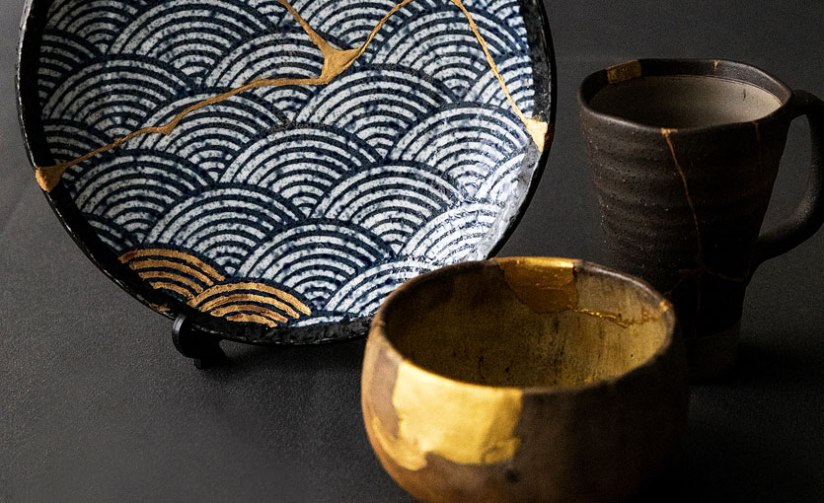
One technique I thought would work especially well on the Japanese/Koi Fish print was kintsugi inspired embellishment (which I’ve begun to visualise in the final concept sketches). I came across this art form during my visit to the Durham University Oriental Museum, where there were examples of ceramics displayed utilising this technique. The result was beautiful, and the idea behind the process even more so.

Kintsugi is based around the idea that the imperfect is beautiful- while some of us in the Western world prefer things to be new, Japanese people relish repairing broken items and seeing beauty in imperfection. This also links to the wabi-sabi philosophy, which centres around the idea that imperfection and the transience and fragility of perfection is accepted- far different to the obsession with perfection we have in the West.

I’d love to incorporate this into my work, as I too have a fascination with perfect things- I think it’d add some nice little imperfections into my pieces. The fact that I’ll be embellishing these by hand will mimic the original technique; the rest of the imagery will be digitally produced and collated, printing using the risograph which is very ‘perfect’ despite some natural variance in the process.
Hero
Kintsugi – Japanese Ceramic Gold Repair (Sydney Community College, n.d.)


I’ve also started to look at colour palettes and application for the final riso prints- since my palette is somewhat limited, I need to use my trusty Risotto colour swatch pack to look at alternative palettes that would work well. Since my artwork is mostly line-art based, I can use quite dark shades of the inks to intensify the line work while employing lighter, more subtle shades to add interest and shading.

This will be a target for the coming weeks after I’ve finished the base artwork- I’ll use Photoshop to manipulate the grayscale layers to view different colour palettes, which I’ll write about in my sketchbook.

I can’t wait to start properly visualising these finals… I’ll be using Procreate to render and layer my files ready for printmaking~

Blog post on this process coming soon! ❀


References

Carnazzi, S. (n.d.). Kintsugi: the art of precious scars [online]. Available at: https://www.lifegate.com/people/lifestyle/kintsugi  [Accessed 21 Mar 2019].

Collingwood, C. (2019). China Risograph Print Final Concepts [digital].

Collingwood, C. (2019). Japan Risograph Print Final Concepts [digital].

Richardson, J. (2016). WABI-SABI and UNDERSTANDING JAPAN | A PHILOSOPHY AND AESTHETIC AS WORLDVIEW [online]. Available at: https://www.tofugu.com/japan/wabi-sabi/ %5BAccessed 21 Mar 2019]. 

Sydney Community College. (n.d.). Kintsugi – Japanese Ceramic Gold Repair [photograph]. Available at: https://www.sydneycommunitycollege.edu.au/course/kintsugi.gold.repair  [Accessed 21 Mar 2019].
evaluation

Mini Riso- ‘Minerals’ Photography Print / Project Evaluation

Alongside my work for the Penguin Award and the Animation Development projects, I’ve been making a smaller ‘mini’ A4 risograph image, this time making use of photographic elements instead of illustration, as this is something I didn’t get to experiment with when I made my terrarium prints.

I’d originally intended to use my own photography for this side-project, but Royal Mail had other plans since all the rock minerals I’d ordered to photograph haven’t arrived… :c So purely for the purpose of experimentation, I’ve collaged together some royalty-free images (which are all referenced in my project development file) to use as a experiment- I’ll most likely be able to take my own imagery in the future to use for photographic risograph work, as I don’t want to include something in my portfolio that isn’t entirely self-produced. I collaged the images together quickly in Photoshop- I used my notes from my development work as a set of ‘rules’ when laying out the photographs.

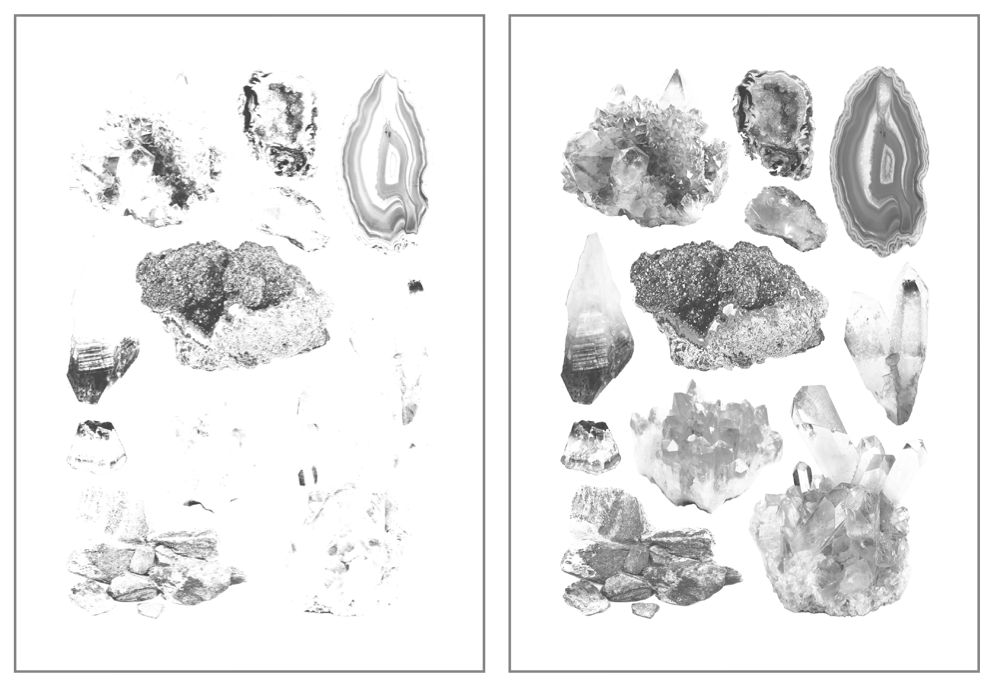
Once this was ready, I converted the image to black and white and duplicated the layer, one of which I edited using various Adjustment tools- I heightened the contrast and brightened up the second/upper layer, which meant only the darkest tones made it through into the final image- I’ll print this in the blue ink we have for the riso, with the base layer (with a wider range of light and mid-tones) printed in pink. Based on past experience with the riso during my terrarium printing run, I’ll be editing these on the riso prior to printing, bringing the ink coverage down to around 15-20%, as I don’t want bright colours on this print. The pink is extremely bright, and the blue extremely dark- hopefully reducing the coverage down to practically nothing will solve the problem. Below is my two final layers, ready for printing:

Screen Shot 2018-12-14 at 10.58.28.png
 Mini Minerals Riso – Printing Layers (Collingwood, 2018)


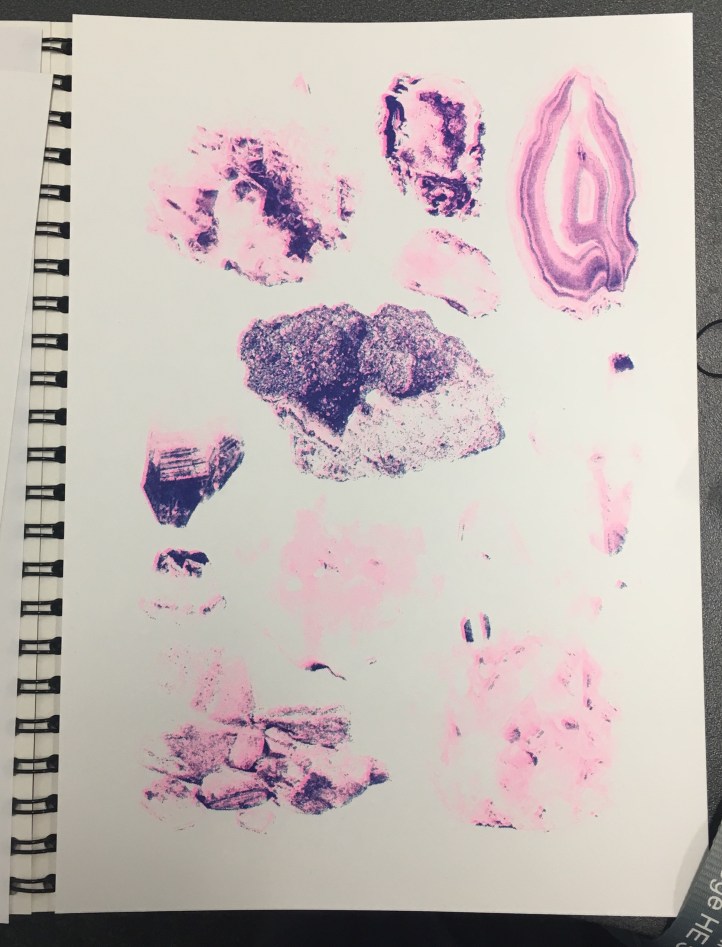
Obviously the printing process was much the same as the terrarium prints (again, all of this is documented much more in-depth in my development file), but this time I added halftones (via the riso)… and it worked well! Except that all of my prints were too light, haha. I initially thought that I’d need to make the masters super light to combat the really pigmented inks, but I think I went too far the other way, as lots of detail was lost in the final prints:

IMG_8117.jpg
My final prints- not quite to plan, but still a success experiment-wise! (Collingwood, 2018)

But, not to worry… this was a purely experimental exercise- when I’m able to take my own pics I’ll run some more prints off again, keeping in mind everything I learned throughout this test. I enjoyed the process anyway, and there’s no improvement to be gained unless you fail first!

Reflecting on the project as a whole… I’m glad I got to use the risograph printer, since it’s a process I’ve been interested in since hearing about it just over a year ago. It’s certainly been unconventional for me, since the colours are so restricted (and BRIGHT!), as well as the digital process involved in making artwork riso-ready. It was really nice to try out new techniques and styles of artwork all in the name of suitability, since prior to this I’ve been quite stuck in my ways. I’d love to revisit this in the future, but for now it’s definitely high time to start on the next Semester 1 projects…

Onwards and upwards c:


References

Collingwood, C. (2018). Mini Minerals Riso- Printing Layers 1 and 2 [Digital].

Collingwood, C. (2018). Mini Minerals Riso- Final Print [Risograph Print].

inspiration

3 Ways to Enhance Your Artwork

When exhibiting artwork (especially when the art is for sale), it’s important to consider new and interesting ways to add interest in order to capture the viewer’s attention, possibly increasing sales in an exceedingly competitive sector of the creative industry.

Of course, this isn’t from a purely business point of view, as the result must also compliment the artwork and be aesthetically pleasing. I love to add things on top of artwork, particularly runs of prints, as it adds a handmade touch that makes each piece unique.

Here are my 3 favourite ways to do this~

1- Surface Embellishment

I’m a big fan of glittery things- anything that sparkles or shifts in the light is sure to catch the eye of a bypasser, whether they like it or not! If the imagery is suited to it, adding a little bit of glitter or other embellishment can really make the difference between run of the mill art, and something people will buy.

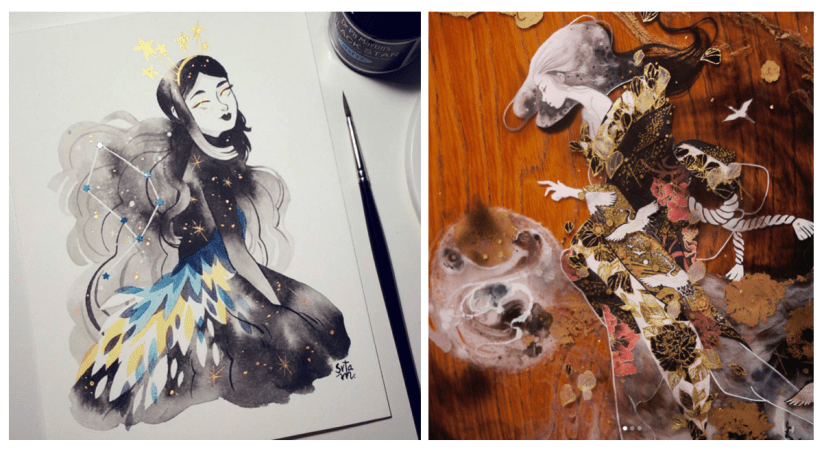
I bought a piece from one of my favourite artists (@m_atelier on Instagram, more info in my references), and she jazzed up the art with tiny star shaped sequins before mailing it to me. As it fit well with the other imagery in the work, it looked lovely and created a sense of personalisation and preciousness.

Another example of surface embellishment is using patterned paper or washi tape- @shardula uses this technique quite often, with gorgeous results that add detail and intricacy to the artwork. I suppose I use this technique myself in some of my artwork- I like to digitally overlay patterns as a replacement for colour (see the Artwork tab for examples of this), which is a similar process.

Screen Shot 2018-12-06 at 21.51.06.png
Left: Lopez (2017). Right: Licudine (2018). 

2- Metallic Overlays

This form of embellishment can come from specially made inks or pens, as well as gold leaf or gold foils- each of these methods is best suited to different applications, so it’s up to you to find out which is best for your artwork. Foils can be added to fabric, which can add ‘a little something extra’ to screen printed tote bags or t-shirts, or they can be applied on top of prints using heat or screen-printed glue.

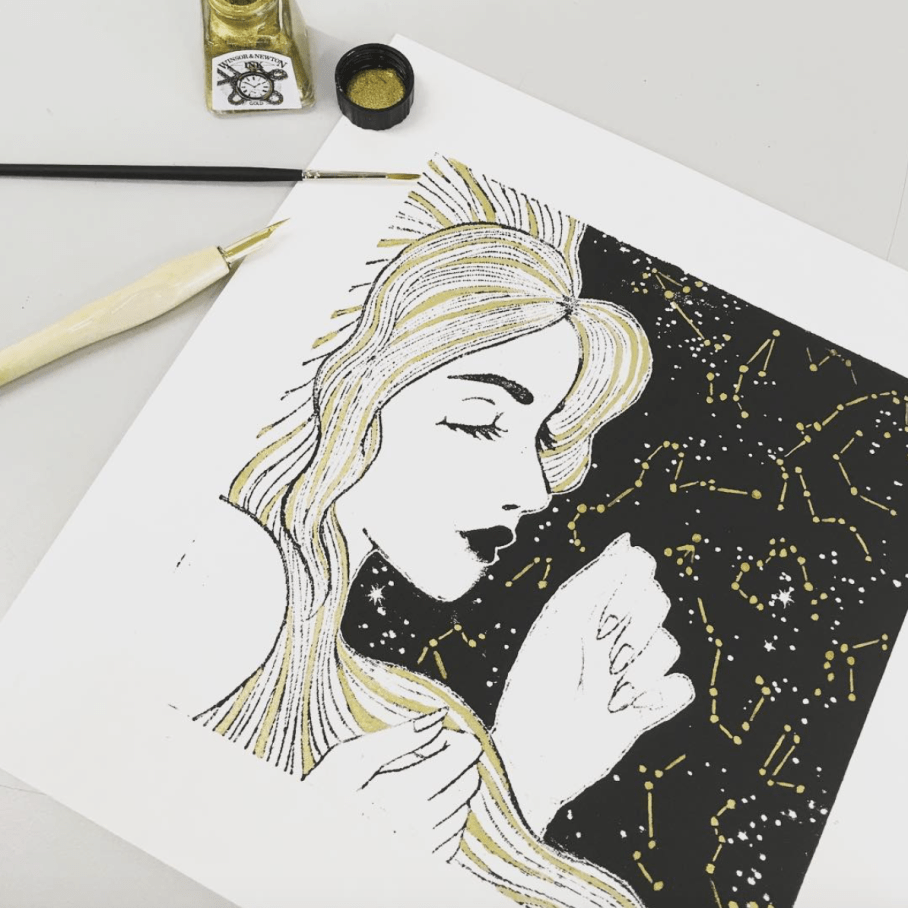
In terms of physical printed or traditional artwork, I find it best to use either pre-filled ink pens (my favourite is the Sakura Touch-Pen Fine, available here in all sorts of finishes), or nib-pens/fine brushes with inks such as the Winsor and Newton metallic calligraphy inks (link here), which are slightly more opaque and concentrated (but are a little harder to get the hang of).

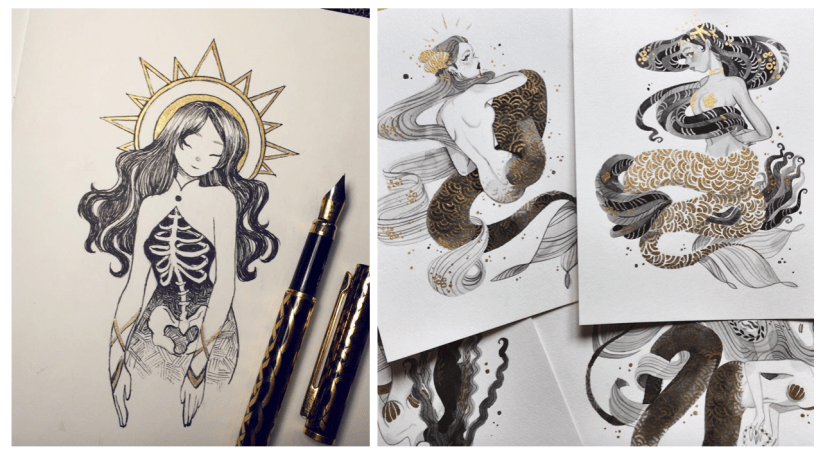
Use metallic embellishment to add highlights or extra detail to the art- again, some of my favourite examples are from artists such as Sibylline Meynet (@sibylline_m) and Feefal (@feefal), shown below:

Screen Shot 2018-12-06 at 22.24.15.png
Left: Feefal (2018). Right: Meynet (2016). 

3- Proper Packaging

If the art is hand-pulled and won’t be produced again in the same format, you can market the pieces as a ‘limited run’ by numbering and signing them individually on the border of the art. Doing this adds value to the work, as numbered editions are considered the highest quality pieces from a run of prints (e.g. risograph, screen print, etc).

If art is being offered for sale, the general consensus is to sign numbered editions in the border of the art, and printed/mass produced prints inside the actual artwork (e.g. in the bottom corner of the piece, as long as it does not detract from the overall image). Always use pencil when numbering/signing artwork in the border, as this cannot be reproduced by printing!

By investing in some fitted cellophane bags, you can protect artwork from fingerprints or creases when selling, as well as add to the value. Mounting the artwork can also add to the overall appeal, as presentation of artwork is important when vying against competing illustrators. Additionally, including a business card with each print, or making a special branded stamp or sticker to seal the packet can add a sense of professionalism.


All of these techniques can help set your art apart from the rest aesthetically, as well as increasing value which in turn will allow you to make a little bit more profit on a piece.

I hope this was slightly helpful… of course the quality of the artwork is second to none when it comes to a successful illustrator, so consider this above all else ♥


References

Cass Art (n.d.). Winsor and Newton Ink [online]. Available at: https://www.cassart.co.uk/drawing/calligraphy/calligraphy_ink/winsor_newton_ink.htm?productid=1609&utm_source=google&utm_medium=base&gclid=EAIaIQobChMIlPOX15qM3wIVCEPTCh2__AkXEAQYAyABEgKbQPD_BwE [Accessed 3 Dec 2018].

Cult Pens (n.d.). Sakura Pen-Touch Fine. [online]. Available at: https://www.cultpens.com/i/q/SK21037/sakura-pen-touch-fine?gclid=EAIaIQobChMIoavCs5mM3wIVQeJ3Ch3cEgMdEAQYASABEgLa4fD_BwE [Accessed 3 Dec 2018].

Feefal. (n.d.). Instagram – @feefal [online]. Available at: https://www.instagram.com/feefal/ [Accessed 3 Dec 2018].

Feefal (2018). Untitled [Ink].

Licudine, M. (n.d.). Instagram – @shardula [online]. Available at: https://www.instagram.com/shardula/ [Accessed 3 Dec 2018].

Licudine, M. (2018). Golden [Mixed media].

Lopez, M. (n.d.) Instagram – @m_atelier [online]. Available at: https://www.instagram.com/m_atelier/ [Accessed 3 Dec 2018].

Lopez, M. (2017). Pavonis [Watercolour, ink].

Meynet, S. (n.d.). Instagram – @sibylline_m [online]. Available at: https://www.instagram.com/sibylline_m/ [Accessed 3 Dec 2018].

Meynet, S (2016). Mermay 2016 [Ink].


research

Risograph Research

It’s now the third week of my timetabled period in which I’m meant to be working on the Printmaking project; while the work I’ve produced in the past 2 weeks isn’t completely irrelevant, it’s high time I started getting deeper into the risograph side of things, e.g. how it works, the process and how to create artwork suitable for the riso.

Dare I say… from the research I’ve done so far, it actually sounds easier than I’d initially anticipated. An actual miracle.

From what I’ve gathered, risograph printing is essentially a cross between screen printing and photocopying, but more environmentally friendly and with a more limited colour range (MUCH more on this in my project research- I’m just doing a quick recap).

Having said that, it’s still quite technical and very different from the processes I’m used to working with. For example, you have to keep in mind the bleed areas around the design, the potential for accidental overlap, and the possibility of errors due to the machine, e.g. roller marks. However, through careful planning I’m certain a lot of these areas of concern can be sidestepped- respectively, this could be through careful border layout, trapping line and colour, and laying out heavily inked areas accordingly. (HatoPress.net, n.d.).

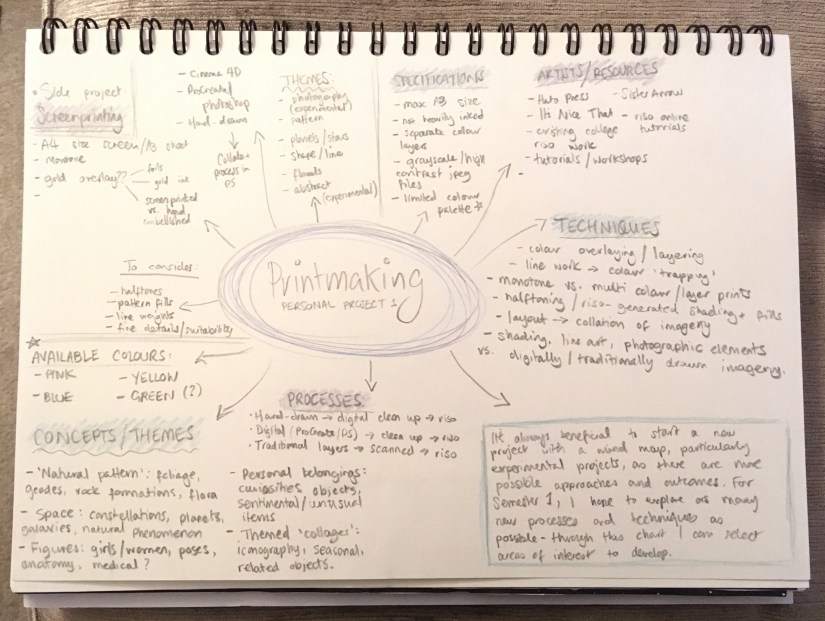
It’s quite a lot to keep in mind, but doing an ample amount of research prior to designing imagery has given me a really good basis of knowledge on which to build the project. My initial mind map helps me to plan out the work I need to do as the project progresses:

IMG_7945.jpg
Initial Mind Map- I find these useful at the start of every project. (Collingwood, 2018.)

Pending the success of this introductory project, I could utilise this technique to make zines, posters, business cards etc for final show- the colour palette might be more limited, but it’s infinitely less laborious than screen printing (and most of the other traditional printing processes, for that matter)~


References

Collingwood, C. (2018). Personal Project 1 – Initial Mind Map.

HatoPress.net. (n.d.). Printing – Risograph. [online] Available at: https://hatopress.net/printing/#guide-item-1 [Accessed 22 Oct. 2018].

evaluation, portfolio, SWOT/Target Setting

Printing Session and Week Reflection 19.10.18

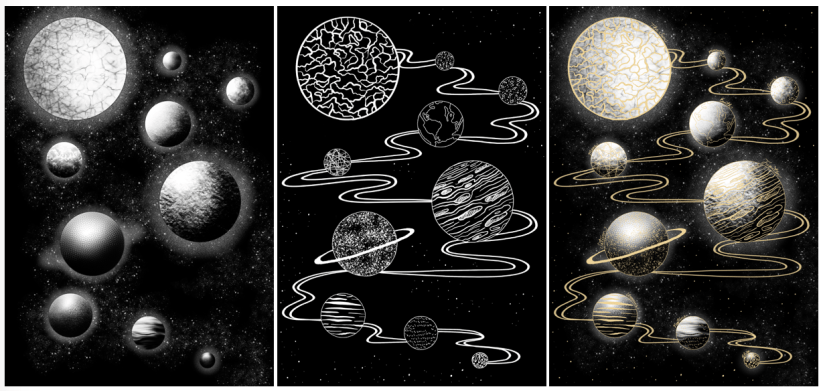
Over the past week, I’ve worked on a simple design that can translate into a screen print. Basing my concept on the idea of planets and digital fills (as inspired by the tutorial Dave showed us on Friday), I worked in Procreate to design both a gold layer, and a black and white screenprinted layer. Final designs below (left to right: Base/screenprinted layer, gold leaf layer, mock up of ‘final’ image with both layers):

Screen Shot 2018-10-22 at 10.44.51
Left to right: Figure 1, Figure 2, Figure 3

Using Procreate is a whole new learning curve for me, as up until now I’ve worked mostly in Photoshop. My previous digital work has been done using a Wacom Intuos tablet, which I often found a bit hard to use (e.g. not being able to rotate it to draw, having to reference back to the screen when drawing, small size and lagging software).

Overall I was happy with my workflow, but earlier this year I invested in an iPad Pro as an additional tool. Ultimately I’ll still finalise my work in Photoshop as Procreate isn’t as extensive, but it’s invaluable having a drawing device with a screen- it feels much more natural, and it’s easier to draft out artwork compared to using a conventional drawing tablet.

One of the most useful tools I discovered actually came from a calligraphy brush kit- a variable line brush that smooths jagged edges and creates nicely curved lines (almost in a similar style to Illustrator, but without all the fiddling). There’s a plethora of times that I could have used this brush in the past, so I’ll definitely keep this in mind for the future!

Come Friday morning, it became quite clear that I was a bit ambitious with the black layer- Dave suggested that I instead print the gold layer as a complete image, so I decided to go with this (possibly going back and editing the black layer to be more screen print friendly at a later date). I’m glad I discovered this early on in the year, as it’ll inform any future imagery that I produce for screen printing.

I experienced some issues with the screen machine- my design wasn’t burned to the screen properly; the black background border was fuzzy on one corner. I’m putting this down to a technical issue that will hopefully be fixed in the future, as I think having a border on a screen print sets it off nicely, especially for trimming and framing. I’ll probably mask the corner border off and correct this by painting on the acrylic in ‘post-production’.

In the afternoon we were shown a quick recap of how to gold foil using the heat press- this was really useful because although I’ve worked with this process before, it was quite a few years ago now and I definitely benefitted from the refresh. There’s a much wider variety of foils now (e.g. iridescent foil, clear foil, and an array of different coloured metallic foils), all of which will be nice to experiment with ♥

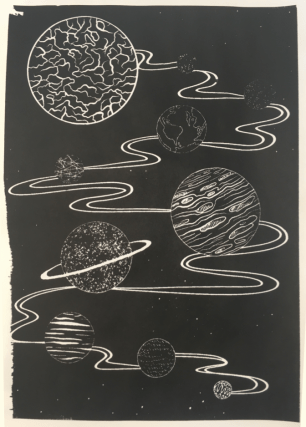
Friday was full of trial and error- in addition to the corner not being complete on any of my prints (which was expected), I had lots of issues with the amount of ink I was using (usually not enough ink). My 6th print (out of 8 total) was the most successful- I was surprised how well the fine lines came out, despite the pre-emptive warning that 12px was the finest line weight that would translate optimally. Below is my most successful print (I could have used slightly less ink):

Screen Shot 2018-10-22 at 11.14.30
Figure 4

I really love the process of screenprinting, so I’ll definitely be revisiting this in the future, hopefully with better results.

In the next week, I plan to finally start on my riso project- I’m a bit stressed out about this as I haven’t stuck to my timetable thus far (which is an awful start to the year). However, the past week hasn’t gone to waste as the development for this screen print can be linked into my Printmaking project as development and technique exploration, which is the purpose of the first Semester anyway~


References

Figure 1: Collingwood, C. (2018). Planets (Base Layer) [Digital].

Figure 2: Collingwood, C. (2018). Planets (Gold Layer) [Digital].

Figure 3: Collingwood, C. (2018). Planets [Digital].

Figure 4: Collingwood, C. (2018). Planets Test #6 [Ink].

inspiration, research

Printmaking – Screenprint Experimentation

To start the week, I’ll be working on concepts for the A4 screenprints we’ll be producing on Friday- as this is intended to be experimental, I’ll be straying away from my usual techniques, instead trying out digitally based fills for some of my initial ideas. For example, halftones, custom patterns, noise fills, and other fill techniques that produce results that will work well with a silk screen- since you can add lots of very fine detail with screenprinting, it’ll be a great opportunity to try these new styles out.

The last printmaking project I did involved monoprinting with a laser cut perspex plate- the results were mixed, but most importantly plate printing allowed for a lot less detail on the design (compared to screenprinting).

We were shown a mini tutorial on Photoshop and Cinema 4D, using shaded spheres as an example when applying each technique. They really looked like little planets… so I decided that using the solar system as a base would be a nice way to still include something from my own personal interest.

I may even make a second layer that details additional embellishment on the final design- this way, I can come back to my love of gold foil, using liquid glue to print the exact areas for foiling. I can then go in with the foil, brushing it on by hand. Going back to the monoprint project from Year 2, I used gold ink to work on top of my prints by hand after trying to print with glue… the pressure from the roller combined with the tackiness of the glue ended up a mess (lesson learned)

Screen Shot 2018-10-15 at 13.38.59.png
Collingwood, C. (2016)


Doing it by hand was tedious, but the results were good… yet not perfect. Look at the way the line art came out on the print- the details were too fine for the ink to stick to the printing plate when I rolled out the ink, especially with the white outline bordering the sky. It was a combination of the lines being too thin, and the ink being too thick. It was a lot more cost-effective compared to silk screen printing, but I feel plate printing is more suited to less detailed imagery.

With this new technique I’m trialling, I’ll be able to apply the foil with a lot more precision, yielding better results (as well as being able to have finer details on the base black layer). Also the gold foil is so much more vibrant and pretty compared to gold ink~

I’ll research this thoroughly before I go in and ruin all my prints, but I think if it works well this could be a really useful technique for the future.

There might even be the potential to create runs of hand-embellished prints (e.g. foils, inks, pattern collage, painted details), making each one unique. This could be a good way to market prints that I can sell, either at final show or on sites such as instagram, Etsy, etc.


Watch this space for a Friday update ♥

no pun intended


References

Collingwood, C. (2016). Cassiopia [Ink].

evaluation, research, SWOT/Target Setting

Reflection – 12.10.18

So, I ended up skipping an update last week- it would have been 500 words of me worrywarting over the presentation (glad that’s out the way!)

The presentation didn’t go amazingly, but I suppose it wasn’t exactly bad either. I’m grateful to have patient tutors that helped me through it! I ended up talking for a little over 10 minutes, which is leaning towards the longer side of things, especially since I tried my best to minimise talking by streamlining what I was going to say. In fact, I had a lot more to say that never actually came out of my mouth because of my anxiousness.

I just hope I’ve done enough to earn a First for this module… which is only worth 10 credits. Every little counts!

Friday AM was spent going through the new module (which includes all of the Semester 1 projects for this year). It’s nothing I haven’t done before- I’ll need to make sure I really keep on top of my Harvard Referencing throughout my research though, as this is imperative to passing this module.

We have the opportunity to do some A4 monochromatic screenprints a week today- quite short notice but I’m familiar with the process, preparing imagery etc., so this will be a nice introduction to my Printmaking project (which is mostly going to focus on riso prints).

I actually did quite a lot of screenprinting during my Textile design course, with (usually) successful results. I printed with single and multi colour designs (e.g. using more than one screen on a design), as well as printing with heat-sensitive glue in order to apply gold leaf to certain areas of wallpapers I was working on- that worked especially well.

I’ve learned a lot since then, so I’ll be applying newfound skills (as well as employing old skills that were successful) when I revisit this process next week. As I’ll personally own my printing frames, I’ll be able to continue making prints as often as I like throughout the year. Hopefully this leads to additional runs of prints, either ‘for fun’ or for final show.

Also, since the Proposal was handed in on Monday, I’ve finally been able to start some research into the risograph print process- I really need to educate myself well on the techniques that are available to me, since this is totally new territory for me and I’m determined to make something nice for the first project (to be honest, it’d be great if I could get the hang of the riso enough to be able to make prints to sell at final show… ^^)

Thus far, I’ve looked a little bit into the actual process and what it entails, as well as the process of preparing imagery for printing. I’ll go into more detail in my research file for this project.

Really I think most of my skill learning for the riso will be ‘on the job’, mainly in the form of trial and error/experimentation… that’s the entire point of Semester 1~

So, my targets for the next week include solidifying my workflow and researching deeper into the risograph process. One of my biggest ‘weaknesses’ of this project will be a lack of prior knowledge, but I’m confident I can turn this around into a strength in my skillset as I learn more about how risograph prints are processed and created.


More on this in the coming weeks!